Unofficial · Native macOS

Give the dialits own app

The Ulanzi D100H has seven keys and a dial. The official app carries Chromium, Node and a full Qt stack for its plugin ecosystem: 1 GB on disk, ~500 MB resident.
This project does only the part you actually use — bind one action to each of 12 slots.
~1 MB bundle ~37 MB resident Zero dependencies
UlanziDial Native icon Liquid Glass · macOS 26

Interface

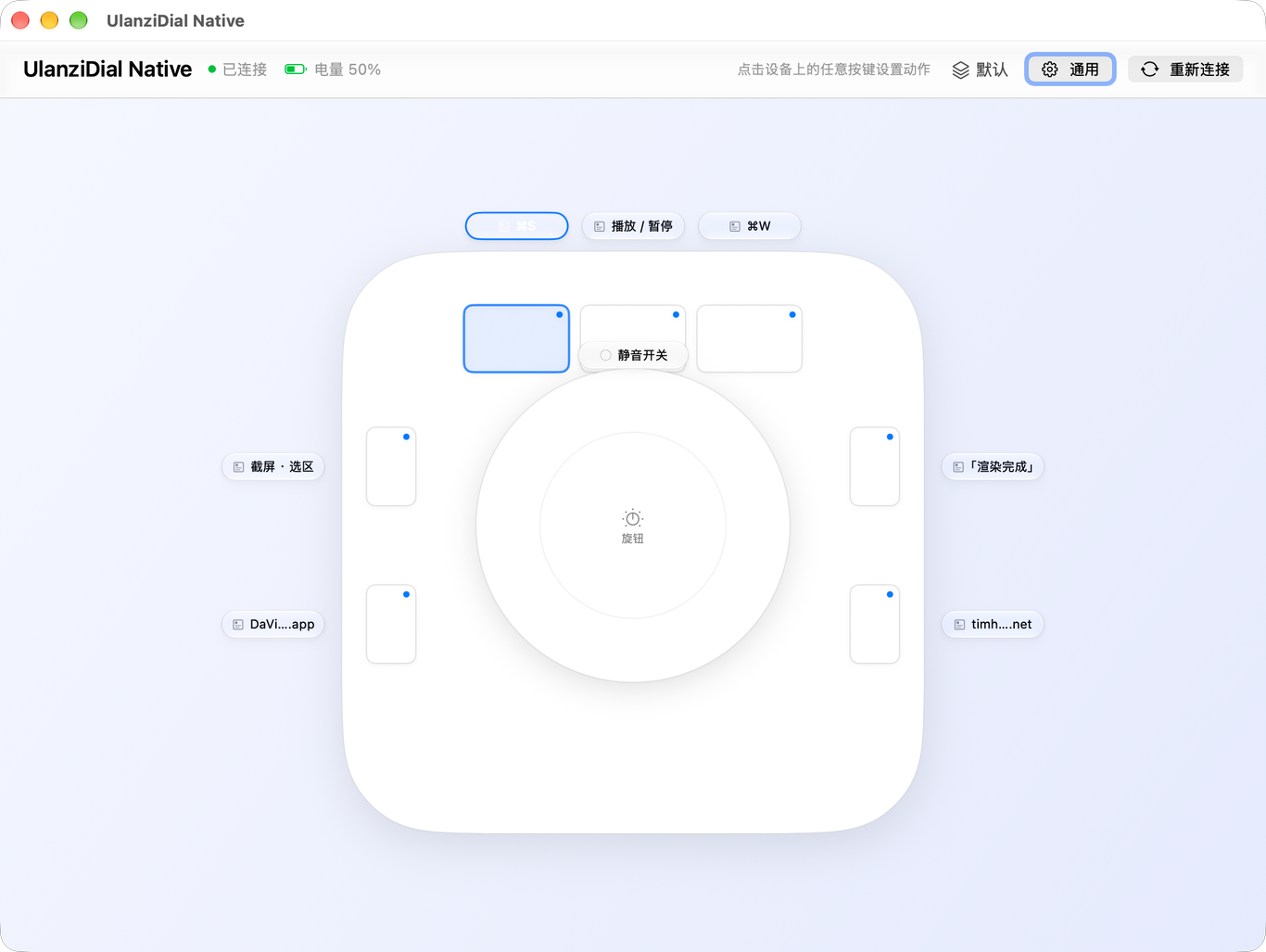
The top-down view is the whole app: click a key and its editor pops up in place.

Main window: top-down device view with binding chips
Top-down view — each key shows its current binding
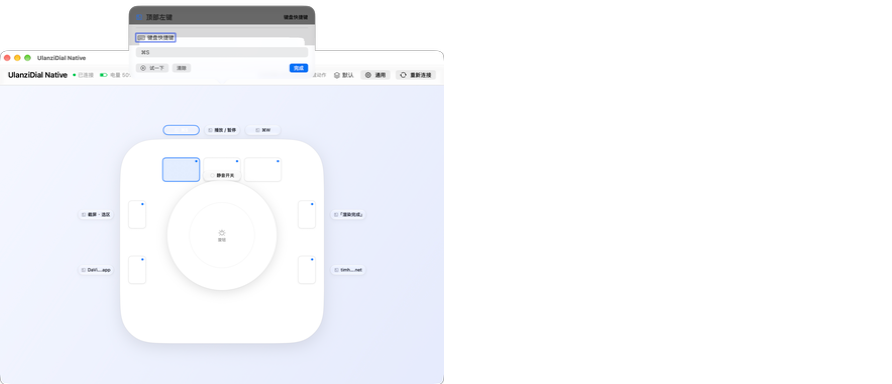
Action editor popover
Action editor — type, parameters, test run

Three gestures, one key

Click, double-click and long-press each get their own action. Keys without a double-click binding fire on press — no waiting for a second click.

ulanzidial set topLeft key cmd+shift+4
ulanzidial set topLeft key cmd+shift+5 --double
ulanzidial set sideUpperLeft app "/Applications/DaVinci Resolve.app" --long
ulanzidial list

Changes apply instantly — the app watches its config file, no restart needed. The CLI is also meant for scripts and AI assistants.

What it does

No plugin market, no lighting control — just "key → action", done cleanly and cheaply.

12 slots, all customizable

Three top keys, four side keys, dial press, dial rotate clockwise / counter-clockwise, and press-and-rotate in both directions. Each slot is bound independently.

DIAL

9 action kinds

Keyboard shortcuts (including system-reserved ones like ⌥⌘Tab), media keys, type text, open an app, open a URL or file, run a command, system actions, multi-step sequences, and none.

ShortcutAny combination, recorded
Media keysVolume, mute, play, brightness
Type textInsert a whole string
Open appLaunch directly
Run commandzsh -lc, scriptable
SystemLock, sleep, screenshot, Mission Control

Sequences and profiles

A single key can run several actions in order, with a wait between steps. You can also keep several profiles and attach them to apps — switch to your editor and the mapping changes with it.

"Top left key"
  └ Multi-step
      1. ⌘S            wait 200 ms
      2. type "render" wait 120 ms
      3. ⌘↩           done

Completely invisible

No Dock icon, no menu bar item. It runs as a background process; ⌥⌘D (configurable) opens settings, closing the window keeps it running. Launch at login uses Apple's SMAppService.

⌥⌘D        →  settings window
close window →  still running
quit         →  nothing left behind

Why rewrite it

The official app's footprint isn't the feature cost — it's the plugin ecosystem: an embedded Chromium to render plugin panels, Node to execute plugin logic.

ItemUlanzi StudioUlanziDial Native
Bundle size1.0 GB~1 MB
Resident memory~500 MB~37 MB
RuntimeChromium + Node + QtSystem frameworks
UIDark engineering styleNative macOS (Liquid Glass)
Plugin market / OBS / lightsYesNo (core binding only)

How it works

The device speaks a proprietary BLE protocol. The community has reverse-engineered it and verified each finding (firmware 1.3.8.1).

Online mode

A heartbeat every second puts the device into "online mode": it reports raw key events (encrypted) and suppresses its built-in volume/media behaviour. About three seconds after heartbeats stop, it falls back to standalone HID mode.

service  0x1971
write    fd01     ← commands / heartbeat
notify   fd00     → key events
cipher   original TEA, 32 rounds
         20-byte packets, first 16 encrypted
event    8b 10 <ID> <STATE>
How is the battery level read?

Not from the vendor's occasional pushes — the app reads the standard GATT battery characteristic (0x2A19) on connect, then subscribes to changes.

Why does it need Accessibility permission?

Synthesizing keys means injecting events with CGEvent; recording shortcuts that the system reserves (like ⌥⌘Tab) needs a CGEventTap. Both require Accessibility.

Build it yourself

Requires macOS 13+ (Liquid Glass needs macOS 26) and the Xcode command line tools. No prebuilt binaries are shipped.

git clone https://github.com/TimmySheep/ulanzidial-native.git
cd ulanzidial-native

./scripts/build.sh            # build (signs if a certificate exists, else ad-hoc)
./scripts/install-local.sh    # build + sign + install to /Applications
./scripts/release.sh          # build + Developer ID sign + notarize

On first launch it asks for Bluetooth (device access) and Accessibility (synthesizing keys).

FAQ

Limitations first, so nobody is surprised.

Can I run it alongside Ulanzi Studio?

No. Both compete for the same BLE device — pick one.

Does it support other Ulanzi devices?

Only verified on the D100H, firmware 1.3.8.1. Other models may use a different protocol.

Why no OBS / lighting / pixel clock?

Those are official plugins, each needing its own implementation (OBS over WebSocket, lighting is a separate BLE protocol). This project is core binding only.

License?

MIT. "Ulanzi" is a trademark of Shenzhen Ulanzi Technology Co., Ltd., used here only to describe compatible hardware.

Is this official software?

No. It's a personal, unofficial replacement, unaffiliated with Ulanzi, containing none of the official app's assets.