
Discover & connect
Find MicYou-compatible servers on the LAN and connect in one tap. Clients speak the protocol, not a hard-coded OS.
QUIET MIC. LIGHT FOOTPRINT.
MicYou turns a phone into a microphone; MicWisp makes that feel almost invisible.
One menu-bar icon. One click. No Dock icon, no fuss.
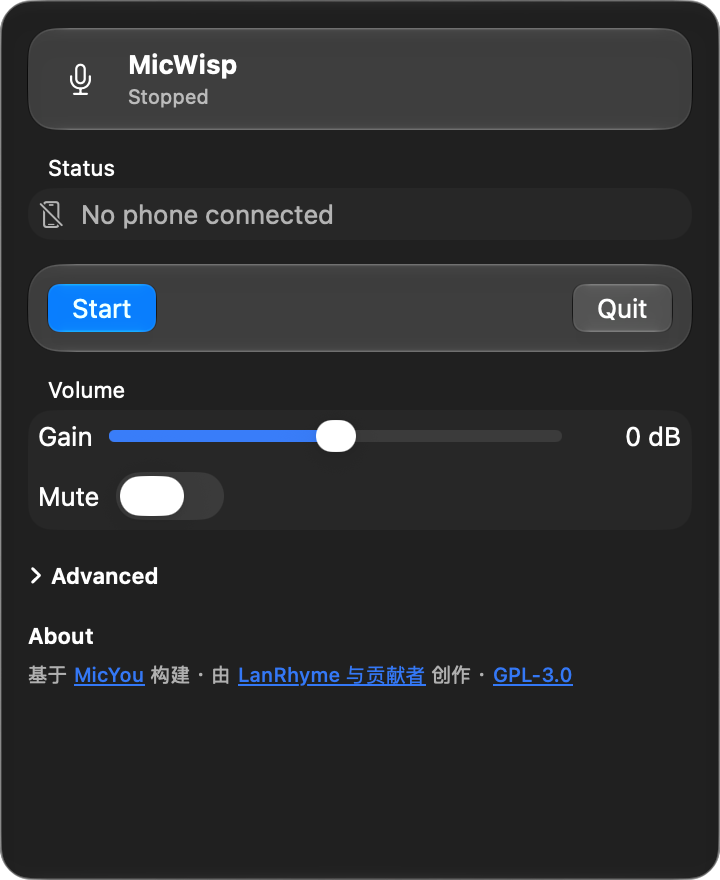
Web backdrop-filter is only an approximation of system Liquid Glass
01 / WHY SO LIGHT.
Lightness is measured. Idle Physical footprint is a real number; features stay on the path of “phone as microphone,” without feature bloat.
macOS idle Physical footprint (cold start 60s, popover closed, no device). Budget baseline ≤ 25 MB.
| Metric | Value |
|---|---|
| Physical footprint (budget) | 18.7 MB |
| footprint tool | 19 MB |
| ps RSS (reference) | 66.89 MB |
| vs 25 MB baseline | −6.3 MB |
Conditions: 2026-11-07 B2 · cold start 60s · popover closed · no device. ps RSS includes reclaimable pages and is not the budget metric.
02 / JUST THE PATH.
Discover, connect, gain, mute, optional noise reduction, automatic recovery — enough to work, nothing that steals attention.
Find MicYou-compatible servers on the LAN and connect in one tap. Clients speak the protocol, not a hard-coded OS.
Adjust volume and mute from the menu-bar panel. Glance when you need it; leave it alone when you don’t.
Off by default. Turn it on when you want: RNNoise / PureVox / Speexdsp, with adjustable intensity.
If the backend exits unexpectedly, MicWisp brings it back so your call or capture keeps going.
On battery or thermal pressure, overhead drops — spectrum, refresh, and polling — without quietly cutting audio quality.
SwiftUI + system Liquid Glass. Menu-bar only, no Dock icon, no stolen workspace.
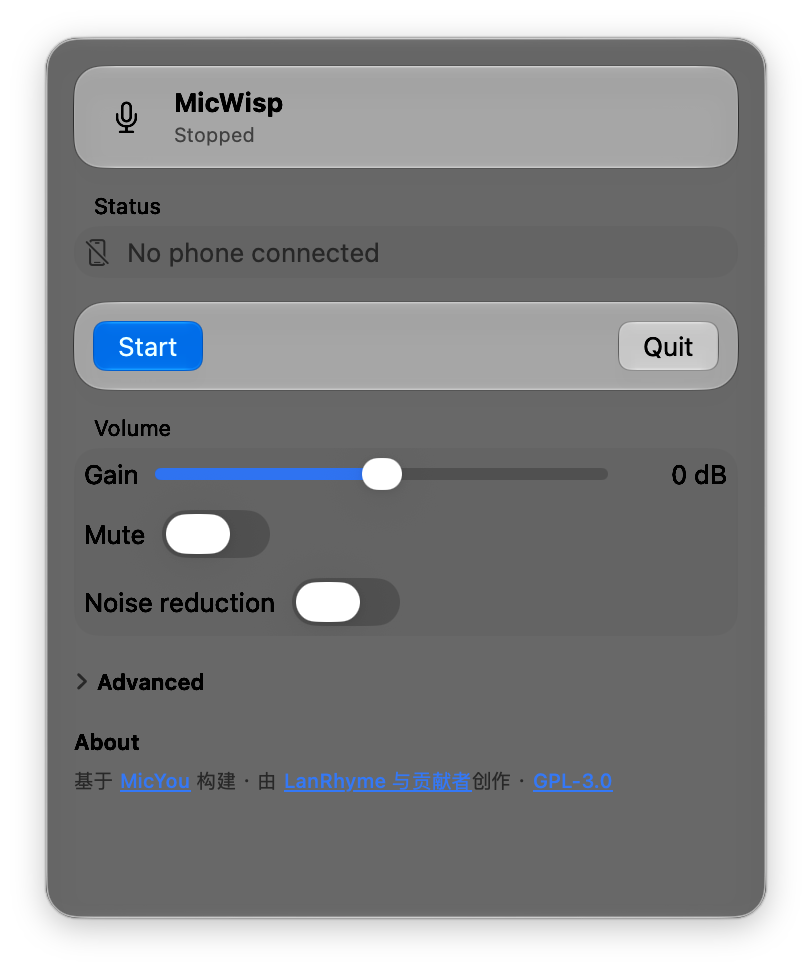
OPTIONAL · OFF BY DEFAULT
Engines come from upstream: RNNoise, PureVox, Speexdsp. Off by default; intensity 0–100 when enabled. Idle sidecar cost barely moves.
03 / WHERE IT RUNS.
macOS first; iOS on TestFlight; Android and Windows follow the roadmap.
DESKTOP
Menu-bar app, downloadable from GitHub Releases.
MOBILE
TestFlight beta — not shipped on the App Store.
MOBILE
Native Compose client in a later roadmap batch.
DESKTOP
Light tray-style shell, scheduled after current batches.
READY WHEN YOU ARE.
The download CTA points at GitHub Releases rather than a single asset filename. Signing and notarization status follow the release notes. If macOS blocks the first open, confirm the download source, then allow it under System Settings → Privacy & Security.
Grab the latest macOS build from GitHub Releases, unzip it, and move it into Applications.
No Dock icon after launch. Click the menu-bar icon to discover devices and connect.
Off by default. Turn on an engine and intensity when you want; battery mode trims overhead automatically.